

Skip to content
Prep · 3PL · FBA · Warehouse software

The operating system for your prep center.Never a spreadsheet.

prepCntr is the operating system for 3PLs and Amazon FBA prep centers: one traceable path from dock to dock, a branded portal your customers run themselves, and Stripe billing that settles straight to your bank.

30-day free trial · $250 usage credit · Cancel anytime

Prep centre staff scanning and labelling cartons on a conveyor line

7

Stages from dock-in to dock-out

3

Approval gates before anything ships

4

Outbound paths: FBA, self-serve, forward, disposal

1

Traceable path every item follows

01 · One path, dock to dock

Seven stages. Three gates. Nothing skipped.

  1. 01
    Dock-inInbound arrives at the dock
  2. 02
    IntakeLog & verify against the manifest
  3. 03
    UnpackUnpack & scan every item
  4. 04
    PrepPrep & label to Amazon spec
  5. 05
    PackPack to ship
    Approval gate
  6. 06
    ReleaseApproved to go
    Approval gate
  7. 07
    Dock-outShips out
    Approval gate

Every item follows the same traceable flow. Pack, release and dock-out are held for approval.

See what happens at each stage →

02 · Built for all — your floor, your customers, your office

Who prepCntr is built for


A worker taping a carton closed on the prep floor

Operations

A workflow the floor will follow.

Every item moves through a single, traceable path. No more sticky notes on bins.

  • Dock-in through dock-out, one path
  • Basic prep, combo packs, multipack conversions
  • One-click FNSKU labels to your thermal printer
  • Scan a barcode, details auto-filled
A customer reviewing their orders on a laptop

Your customers

A portal with your logo on it.

Stop being the bottleneck. Customers see their inventory and place orders themselves.

  • Real-time inventory per customer
  • Forward, FBA Shipment, and Disposal orders
  • Invoices paid online via Stripe
  • Teammates with role-based access
A warehouse office overlooking the floor, with monitors showing live operations

Owners & admins

The control room.

Manage multiple warehouses, gate quality, and get paid, all in one place.

  • Multi-warehouse, location-level inventory
  • Stripe billing built in
  • Three-stage approval queue
  • White-label on your own domain
03 · From the floor
A worker scanning a labelled carton with a handheld barcode scanner

Every item tagged. Every scan on the record.

From the moment a box hits the dock, every unit inside it carries a Tag Code. Nothing moves through the building unidentified — not in a bin, not on a shelf, not halfway through a prep job. Scan a tag at any stage and you get the whole history: which shipment it arrived on, whose inventory it belongs to, and what's been done to it.

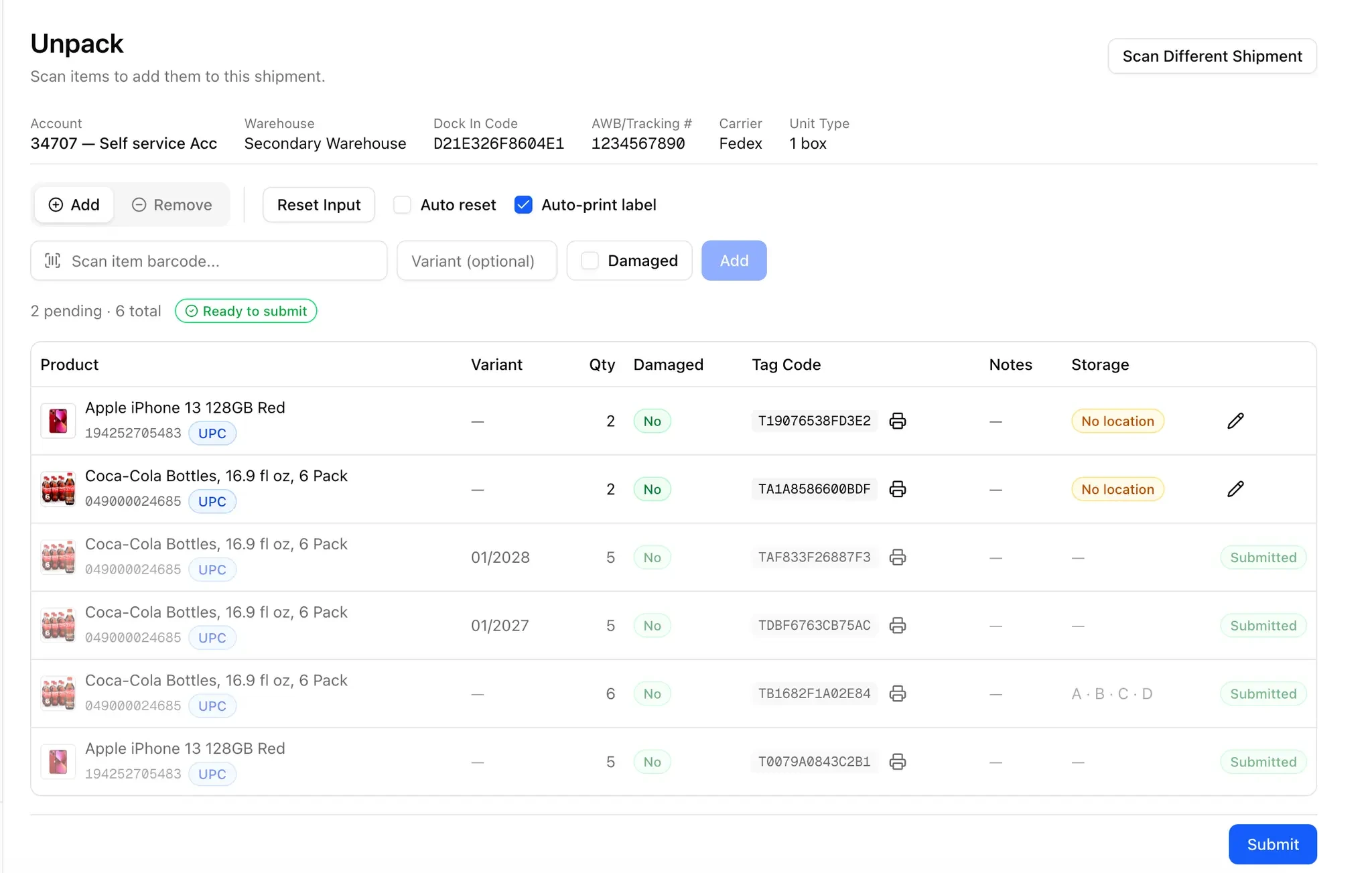
Inbound · Stage 03

Unpack

At Unpack, every item is scanned out of its carton and into inventory, tied to the inbound shipment it arrived on. Tag codes for each item are printed straight to the thermal printer on the floor.

The prepCntr Unpack screen: items being scanned onto an inbound shipment, each with a printed tag code

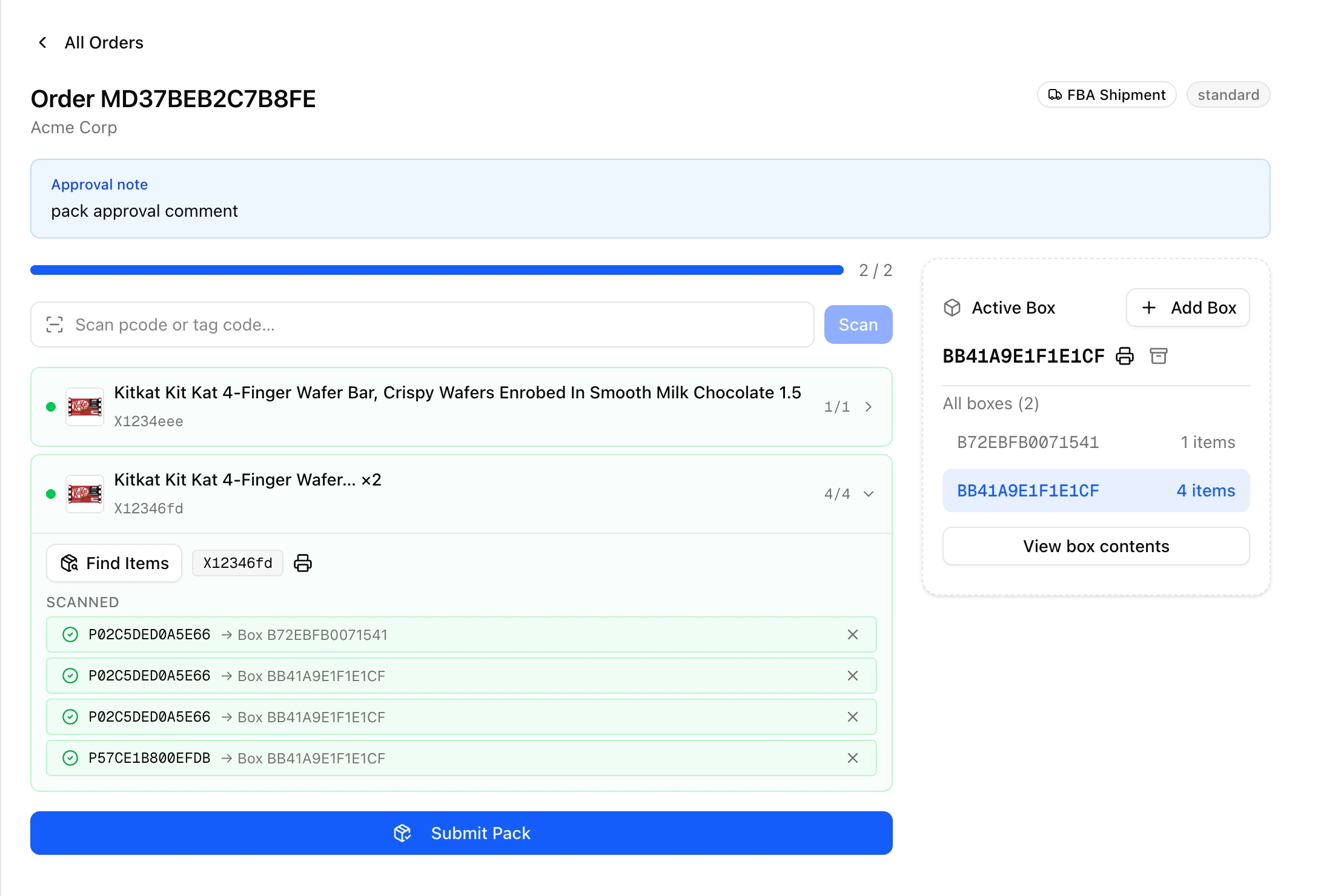
The prepCntr Pack screen: items scanned into boxes on an outbound order, with the approval note in view
Outbound · Stage 05

Pack

During Pack, items are scanned into an outbound shipment. FNSKU and box labels print straight to the thermal printer on the floor.

04 · Why prep centers choose prepCntr

Why prep centers choose prepCntr


01

FBA workflows, end to end.

FNSKU labelling, managed and self-service FBA, customer forward, and disposal — the four outbound paths a prep center actually runs, not a generic warehouse abstraction.

02

Gates that actually gate.

Three approval checkpoints — pack, release, and dock-out — let admins catch mistakes before a shipment leaves the building.

03

White-label, your domain.

On premium tier, run prepcntr.com under the hood and warehouse.yourbrand.com on the outside. Your customers never know.

04

Thermal labels, no fuss.

A purpose-built desktop print app sends FNSKU and box labels straight to the printer your floor already uses. No browser print dialogs.

05

Stripe, out of the box.

Connect your own Stripe account and customers pay invoices by card. Funds settle straight to your bank, never through us.

05 · How payments work

We're software. Your money is yours.

When your customers pay you, the payment is processed by Stripe directly on your own Stripe account and settles to your bank. prepCntr is not a marketplace or payment processor and never holds your customer funds.

Learn how payments work →

Platform
Multi-tenant SaaS
Billing
Stripe, your account
Funds
Settle to your bank
06 · Up and running in minutes

How to get started


  1. 01

    Create your tenant.

    Pick a subdomain, set up your team, and you're in. No setup call required.

  2. 02

    Add warehouses & customers.

    Configure storage locations, invite customers to their branded portals, and connect Stripe for billing.

  3. 03

    Start receiving.

    Scan inbound shipments at the dock, prep and pack, route through approvals, and ship.

07 · Pricing

Simple pricing.

A flat monthly fee for the software, plus a per-unit rate on the work that runs through it. A quiet month means a small usage line.

Flat monthly subscription

$99 for Basic and $149 for Premium per month for the software. The price is the same whether you run one warehouse or five.

Usage on top

We meter three things: units into Unpack, input units in Prep, and units out at Dock out. They bill per unit on the same invoice as your subscription.

Plan capabilities

Both plans include everything operational. Premium adds a custom domain, white-label branding and priority support.

See pricing →

New tenants: 30-day free trial · $250 usage credit · Cancel anytime

08 · The design-partner program

Design partners wanted.

Free or deeply discounted access for a small number of prep centers willing to run real volume and shape the roadmap.

The program →

A prep centre manager shaking hands with a partner on the warehouse floor
09 · Questions, answered

Questions, answered


Who is prepCntr for?

Prep centers and 3PLs that handle inventory for Amazon sellers and e-commerce brands. If you receive boxes, prep them, and ship them out, prepCntr is built for you.

Can I use my own domain?

Yes. Every tenant runs on a yourname.prepcntr.com subdomain by default, and you can verify a custom domain so your customers see your brand, not ours.

How does printing work?

A small desktop print app connects prepCntr to your thermal label printer. FNSKU and box labels print straight to the device.

How do my customers pay me?

Stripe is built in. Customers pay invoices online via Stripe Checkout, and you see payment status against every order.

More questions? Read the full FAQ →

10 · Start now

Run your prep center on prepCntr.

Spin up your tenant in minutes. Bring your team, your warehouses, and your customers along.

A worker moving a pallet down a warehouse aisle towards the outbound dock